# Standalone Activities - Go SDK
> Execute Activities independently without a Workflow using the Temporal Go SDK.
> **Public Preview**
Standalone Activities are Activity Executions that run independently, without being orchestrated by a Workflow. Instead
of starting an Activity from within a Workflow Definition using `workflow.ExecuteActivity()`, you start a Standalone
Activity directly from a Temporal Client using `client.ExecuteActivity()`.
The Activity definition and Worker registration are identical to regular Activities, and only the execution path
differs.
This page covers the following:
- [Get Started with Standalone Activities](#get-started)
- [Define your Activity](#define-activity)
- [Run a Worker with the Activity registered](#run-worker)
- [Execute a Standalone Activity](#execute-activity)
- [Get the result of a Standalone Activity](#get-activity-result)
- [Get a handle to an existing Standalone Activity](#get-activity-handle)
- [List Standalone Activities](#list-activities)
- [Count Standalone Activities](#count-activities)
- [Run Standalone Activities with Temporal Cloud](#run-standalone-activities-temporal-cloud)
- [Move to production with Serverless Workers](#move-to-production-serverless-workers)
> **📝 Note:**
>
> This documentation uses source code from the
> [standalone-activity/helloworld](https://github.com/temporalio/samples-go/tree/main/standalone-activity/helloworld).
>
## Get Started with Standalone Activities
Prerequisites:
- **[Go](https://go.dev/dl/)** 1.22+
- **[Temporal Go SDK](/develop/go/set-up-your-local-go#install-the-temporal-go-sdk)** (v1.41.0 or higher)
- **Temporal CLI** v1.7.0 or higher
Install with Homebrew:
```bash
brew install temporal
```
Or see the [Temporal CLI install guide](/cli/setup-cli) for other platforms.
Verify the installation:
```bash
temporal --version
```
Start the Temporal development server:
```
temporal server start-dev
```
This command automatically starts the Temporal development server with the Web UI, and creates the `default` Namespace.
It uses an in-memory database, so do not use it for real use cases.
> **ℹ️ Info:**
> Temporal Cloud
>
> All code samples on this page use
> [`envconfig.MustLoadDefaultClientOptions()`](https://pkg.go.dev/go.temporal.io/sdk/contrib/envconfig)
> to configure the Temporal Client connection. It responds to [environment
> variables](/references/client-environment-configuration) and [TOML configuration
> files](/references/client-environment-configuration), so the same code works against a local dev
> server and Temporal Cloud without changes. See [Run Standalone Activities with Temporal
> Cloud](#run-standalone-activities-temporal-cloud) below.
>
The Temporal Server should now be available for client connections on `localhost:7233`, and the
Temporal Web UI should now be accessible at [http://localhost:8233](http://localhost:8233). Standalone
Activities are available from the nav bar item located towards the top left of the page:
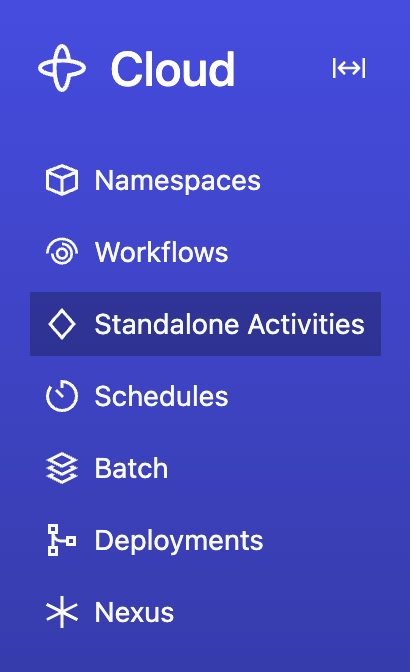 Clone the [samples-go](https://github.com/temporalio/samples-go) repository to follow along:
```
git clone https://github.com/temporalio/samples-go.git
cd samples-go
```
The sample project is structured as follows:
```
standalone-activity/helloworld/
├── activity.go
├── worker/
│ └── main.go
└── starter/
└── main.go
```
## Define your Activity
Define your Activity in a shared file so that both the Worker and starter can reference it.
[standalone-activity/helloworld/activity.go](https://github.com/temporalio/samples-go/blob/main/standalone-activity/helloworld/activity.go)
```go
package helloworld
import (
"context"
"go.temporal.io/sdk/activity"
)
func Activity(ctx context.Context, name string) (string, error) {
logger := activity.GetLogger(ctx)
logger.Info("Activity", "name", name)
return "Hello " + name + "!", nil
}
```
## Run a Worker with the Activity registered
Running a Worker for Standalone Activities is the same as running a Worker for Workflow-driven Activities — you create a
Worker, register the Activity, and call `Run()`. The Worker doesn't need to know whether the Activity will be invoked
from a Workflow or as a Standalone Activity.
See [How to develop a Worker in Go](/develop/go/workers/run-worker-process#develop-worker) for more details on Worker setup and
configuration options.
[standalone-activity/helloworld/worker/main.go](https://github.com/temporalio/samples-go/blob/main/standalone-activity/helloworld/worker/main.go)
```go
package main
import (
"github.com/temporalio/samples-go/standalone-activity/helloworld"
"go.temporal.io/sdk/client"
"go.temporal.io/sdk/contrib/envconfig"
"go.temporal.io/sdk/worker"
"log"
)
func main() {
c, err := client.Dial(envconfig.MustLoadDefaultClientOptions())
if err != nil {
log.Fatalln("Unable to create client", err)
}
defer c.Close()
w := worker.New(c, "standalone-activity-helloworld", worker.Options{})
w.RegisterActivity(helloworld.Activity)
err = w.Run(worker.InterruptCh())
if err != nil {
log.Fatalln("Unable to start worker", err)
}
}
```
Open a new terminal, navigate to the `samples-go` directory, and run the Worker:
```
go run standalone-activity/helloworld/worker/main.go
```
Leave this terminal running - the Worker needs to stay up to process activities.
## Execute a Standalone Activity
Use [`client.ExecuteActivity()`](https://pkg.go.dev/go.temporal.io/sdk/client#Client) to start a Standalone Activity
Execution. This is called from application code (for example, a starter program), not from inside a Workflow Definition.
`ExecuteActivity` returns an [`ActivityHandle`](https://pkg.go.dev/go.temporal.io/sdk/client#ActivityHandle) that you
can use to get the result, describe, cancel, or terminate the Activity.
The following starter program demonstrates how to execute a Standalone Activity, get its result, list activities, and
count activities:
[standalone-activity/helloworld/starter/main.go](https://github.com/temporalio/samples-go/blob/main/standalone-activity/helloworld/starter/main.go)
```go
package main
import (
"context"
"github.com/temporalio/samples-go/standalone-activity/helloworld"
"go.temporal.io/sdk/client"
"go.temporal.io/sdk/contrib/envconfig"
"log"
"time"
)
func main() {
c, err := client.Dial(envconfig.MustLoadDefaultClientOptions())
if err != nil {
log.Fatalln("Unable to create client", err)
}
defer c.Close()
activityOptions := client.StartActivityOptions{
ID: "standalone_activity_helloworld_ActivityID",
TaskQueue: "standalone-activity-helloworld",
ScheduleToCloseTimeout: 10 * time.Second,
}
handle, err := c.ExecuteActivity(context.Background(), activityOptions, helloworld.Activity, "Temporal")
if err != nil {
log.Fatalln("Unable to execute activity", err)
}
log.Println("Started standalone activity", "ActivityID", handle.GetID(), "RunID", handle.GetRunID())
var result string
err = handle.Get(context.Background(), &result)
if err != nil {
log.Fatalln("Unable get standalone activity result", err)
}
log.Println("Activity result:", result)
resp, err := c.ListActivities(context.Background(), client.ListActivitiesOptions{
Query: "TaskQueue = 'standalone-activity-helloworld'",
})
if err != nil {
log.Fatalln("Unable to list activities", err)
}
log.Println("ListActivity results")
for info, err := range resp.Results {
if err != nil {
log.Fatalln("Error iterating activities", err)
}
log.Printf("\tActivityID: %s, Type: %s, Status: %v\n",
info.ActivityID, info.ActivityType, info.Status)
}
resp1, err := c.CountActivities(context.Background(), client.CountActivitiesOptions{
Query: "TaskQueue = 'standalone-activity-helloworld'",
})
if err != nil {
log.Fatalln("Unable to count activities", err)
}
log.Println("Total activities:", resp1.Count)
}
```
You can pass the Activity as either a function reference or a string Activity type name:
```go
handle, err := c.ExecuteActivity(ctx, options, helloworld.Activity, "arg1")
// Using a string type name
handle, err := c.ExecuteActivity(ctx, options, "Activity", "arg1")
```
`client.StartActivityOptions` requires `ID`, `TaskQueue`, and at least one of `ScheduleToCloseTimeout` or
`StartToCloseTimeout`. See [`StartActivityOptions`](https://pkg.go.dev/go.temporal.io/sdk/client#StartActivityOptions)
in the API reference for the full set of options.
To run the starter:
1. Make sure the Temporal Server is running (from the [Get Started](#get-started) step above).
2. Make sure the Worker is running (from the [Run a Worker](#run-worker) step above).
3. Open a new terminal, navigate to the `samples-go` directory, and run:
```
go run standalone-activity/helloworld/starter/main.go
```
Or use the Temporal CLI to execute a Standalone Activity:
```bash
temporal activity execute \
--type Activity \
--activity-id standalone_activity_helloworld_ActivityID \
--task-queue standalone-activity-helloworld \
--schedule-to-close-timeout 10s \
--input '"Temporal"'
```
## Get the result of a Standalone Activity
Use `ActivityHandle.Get()` to block until the Activity completes and retrieve its result. This is analogous to calling
`Get()` on a `WorkflowRun`.
```go
var result string
err = handle.Get(context.Background(), &result)
if err != nil {
log.Fatalln("Activity failed", err)
}
log.Println("Activity result:", result)
```
If the Activity completed successfully, the result is deserialized into the provided pointer. If the Activity failed,
the failure is returned as an error.
Or use the Temporal CLI to wait for a result by Activity ID:
```bash
temporal activity result --activity-id standalone_activity_helloworld_ActivityID
```
## Get a handle to an existing Standalone Activity
Use `client.GetActivityHandle()` to create a handle to a previously started Standalone Activity. This is analogous to
`client.GetWorkflow()` for Workflow Executions.
Both `ActivityID` and `RunID` are required.
```go
handle := c.GetActivityHandle(client.GetActivityHandleOptions{
ActivityID: "standalone_activity_helloworld_ActivityID",
RunID: "the-run-id",
})
// Use the handle to get the result, describe, cancel, or terminate
var result string
err := handle.Get(context.Background(), &result)
if err != nil {
log.Fatalln("Unable to get activity result", err)
}
```
## List Standalone Activities
Use [`client.ListActivities()`](https://pkg.go.dev/go.temporal.io/sdk/client#Client) to list Standalone Activity
Executions that match a [List Filter](/list-filter) query. The result contains an iterator that yields
[`ActivityExecutionInfo`](https://pkg.go.dev/go.temporal.io/sdk/client#ActivityExecutionInfo) entries.
These APIs return only Standalone Activity Executions. Activities running inside Workflows are not included.
```go
resp, err := c.ListActivities(context.Background(), client.ListActivitiesOptions{
Query: "TaskQueue = 'standalone-activity-helloworld'",
})
if err != nil {
log.Fatalln("Unable to list activities", err)
}
for info, err := range resp.Results {
if err != nil {
log.Fatalln("Error iterating activities", err)
}
log.Printf("ActivityID: %s, Type: %s, Status: %v\n",
info.ActivityID, info.ActivityType, info.Status)
}
```
Or use the Temporal CLI:
```bash
temporal activity list
```
The `Query` field accepts the same [List Filter](/list-filter) syntax used for Workflow Visibility. For example,
`"ActivityType = 'Activity' AND Status = 'Running'"`.
## Count Standalone Activities
Use [`client.CountActivities()`](https://pkg.go.dev/go.temporal.io/sdk/client#Client) to count Standalone Activity
Executions that match a [List Filter](/list-filter) query. This returns the total count of executions (running,
completed, failed, etc.) - not the number of queued tasks. It works the same way as counting Workflow Executions.
```go
resp, err := c.CountActivities(context.Background(), client.CountActivitiesOptions{
Query: "TaskQueue = 'standalone-activity-helloworld'",
})
if err != nil {
log.Fatalln("Unable to count activities", err)
}
log.Println("Total activities:", resp.Count)
```
Or use the Temporal CLI:
```bash
temporal activity count
```
## Run Standalone Activities with Temporal Cloud
The code samples on this page use `envconfig.MustLoadDefaultClientOptions()`, so the same code
works against Temporal Cloud - just configure the connection via environment variables or a TOML
profile. No code changes are needed.
For a step-by-step guide on connecting to Temporal Cloud, including Namespace creation, certificate
generation, and authentication setup in the Cloud UI, see
[Connect to Temporal Cloud](/develop/go/client/temporal-client#connect-to-temporal-cloud).
### Connect with mTLS
Set these environment variables with values from your Temporal Cloud Namespace settings:
```
export TEMPORAL_ADDRESS=..tmprl.cloud:7233
export TEMPORAL_NAMESPACE=.
export TEMPORAL_TLS_CLIENT_CERT_PATH='path/to/your/client.pem'
export TEMPORAL_TLS_CLIENT_KEY_PATH='path/to/your/client.key'
```
### Connect with an API key
Set these environment variables with values from your Temporal Cloud API key settings:
```
export TEMPORAL_ADDRESS=..tmprl.cloud:7233
export TEMPORAL_NAMESPACE=.
export TEMPORAL_API_KEY=
```
Then run the Worker and starter code as shown in the earlier sections.
## Move to production with Serverless Workers
After you have run the Standalone Activity locally and configured its Temporal Cloud connection, you can deploy its
Worker as a [Serverless Worker](/serverless-workers). Serverless Workers run on ephemeral, on-demand compute rather than
as long-lived processes.
> **📝 Note:**
>
> Serverless Workers are a separate Pre-release feature. To request access, create a
> [support ticket](/cloud/support#support-ticket) or contact your account team.
>
### AWS Lambda
AWS Lambda is the first Serverless Worker provider example. When a Standalone Activity Task is added to a Task Queue with
no active poller, Temporal invokes the Lambda function configured for that Task Queue. The Worker connects, processes
available Tasks, and shuts down before the Lambda invocation deadline.
The
[Standalone Activity Lambda sample](https://github.com/temporalio/samples-go/tree/main/standalone-activity/lambda-worker)
contains an Activity, an activity-only Lambda Worker, and a starter program:
```text
standalone-activity/lambda-worker/
├── activity.go
├── worker/
│ └── main.go
└── starter/
└── main.go
```
#### Register the Activity with a Lambda Worker
Use the Go SDK's `lambdaworker` package to run the Worker inside Lambda. Set the Worker Deployment name, Build ID, and
Task Queue, then register the Activity.
[standalone-activity/lambda-worker/worker/main.go](https://github.com/temporalio/samples-go/blob/main/standalone-activity/lambda-worker/worker/main.go)
```go
package main
import (
lambdaworker "go.temporal.io/sdk/contrib/aws/lambdaworker"
"go.temporal.io/sdk/worker"
lambdaactivity "github.com/temporalio/samples-go/standalone-activity/lambda-worker"
)
func main() {
lambdaworker.RunWorker(worker.WorkerDeploymentVersion{
DeploymentName: "standalone-activity-lambda",
BuildID: "build-1",
}, func(options *lambdaworker.Options) error {
options.TaskQueue = "standalone-activity-lambda"
options.RegisterActivity(lambdaactivity.Greet)
return nil
})
}
```
An activity-only Worker doesn't register a Workflow, so it doesn't need to set a Workflow
[versioning behavior](/worker-versioning#versioning-behaviors). The `WorkerDeploymentVersion` is still required because
Serverless Workers use Worker Deployment Versioning to route Tasks to the configured Lambda function.
#### Deploy the Worker to Lambda
Follow [Deploy a Serverless Worker on AWS Lambda](/production-deployment/worker-deployments/serverless-workers/aws-lambda)
to build and package the Worker, create the Lambda function, configure IAM, and create the Worker Deployment Version.
Run the guide's build commands from `standalone-activity/lambda-worker` so `./worker` resolves to the sample's Worker
package. Use these values when you configure the Worker Deployment Version:
| Setting | Value |
| --- | --- |
| Worker Deployment name | `standalone-activity-lambda` |
| Build ID | `build-1` |
| Task Queue | `standalone-activity-lambda` |
The Worker Deployment name and Build ID must match the values passed to `lambdaworker.RunWorker`. After you create the
version, [set it as current](/production-deployment/worker-deployments/serverless-workers/aws-lambda#set-current-version)
so Temporal can route Tasks to it.
#### Execute the Standalone Activity
Run the starter outside Lambda. It connects to Temporal and schedules the Standalone Activity on the same Task Queue as
the Serverless Worker.
[standalone-activity/lambda-worker/starter/main.go](https://github.com/temporalio/samples-go/blob/main/standalone-activity/lambda-worker/starter/main.go)
```go
package main
import (
"context"
"log"
"time"
"go.temporal.io/sdk/client"
"go.temporal.io/sdk/contrib/envconfig"
lambdaactivity "github.com/temporalio/samples-go/standalone-activity/lambda-worker"
)
func main() {
temporalClient, err := client.Dial(envconfig.MustLoadDefaultClientOptions())
if err != nil {
log.Fatalln("Unable to create Temporal Client", err)
}
defer temporalClient.Close()
handle, err := temporalClient.ExecuteActivity(
context.Background(),
client.StartActivityOptions{
ID: "standalone-activity-lambda-greeting",
TaskQueue: "standalone-activity-lambda",
ScheduleToCloseTimeout: time.Minute,
},
lambdaactivity.Greet,
"Temporal",
)
if err != nil {
log.Fatalln("Unable to execute Standalone Activity", err)
}
var result string
if err := handle.Get(context.Background(), &result); err != nil {
log.Fatalln("Standalone Activity failed", err)
}
log.Println("Standalone Activity result:", result)
}
```
Configure the starter's Temporal Client connection using
[environment configuration](/references/client-environment-configuration), then run it from the sample directory:
```bash
go run ./starter
```
When the starter schedules the Activity, Temporal invokes the Lambda function, and the Lambda Worker processes the
Activity Task and returns the result.
Clone the [samples-go](https://github.com/temporalio/samples-go) repository to follow along:
```
git clone https://github.com/temporalio/samples-go.git
cd samples-go
```
The sample project is structured as follows:
```
standalone-activity/helloworld/
├── activity.go
├── worker/
│ └── main.go
└── starter/
└── main.go
```
## Define your Activity
Define your Activity in a shared file so that both the Worker and starter can reference it.
[standalone-activity/helloworld/activity.go](https://github.com/temporalio/samples-go/blob/main/standalone-activity/helloworld/activity.go)
```go
package helloworld
import (
"context"
"go.temporal.io/sdk/activity"
)
func Activity(ctx context.Context, name string) (string, error) {
logger := activity.GetLogger(ctx)
logger.Info("Activity", "name", name)
return "Hello " + name + "!", nil
}
```
## Run a Worker with the Activity registered
Running a Worker for Standalone Activities is the same as running a Worker for Workflow-driven Activities — you create a
Worker, register the Activity, and call `Run()`. The Worker doesn't need to know whether the Activity will be invoked
from a Workflow or as a Standalone Activity.
See [How to develop a Worker in Go](/develop/go/workers/run-worker-process#develop-worker) for more details on Worker setup and
configuration options.
[standalone-activity/helloworld/worker/main.go](https://github.com/temporalio/samples-go/blob/main/standalone-activity/helloworld/worker/main.go)
```go
package main
import (
"github.com/temporalio/samples-go/standalone-activity/helloworld"
"go.temporal.io/sdk/client"
"go.temporal.io/sdk/contrib/envconfig"
"go.temporal.io/sdk/worker"
"log"
)
func main() {
c, err := client.Dial(envconfig.MustLoadDefaultClientOptions())
if err != nil {
log.Fatalln("Unable to create client", err)
}
defer c.Close()
w := worker.New(c, "standalone-activity-helloworld", worker.Options{})
w.RegisterActivity(helloworld.Activity)
err = w.Run(worker.InterruptCh())
if err != nil {
log.Fatalln("Unable to start worker", err)
}
}
```
Open a new terminal, navigate to the `samples-go` directory, and run the Worker:
```
go run standalone-activity/helloworld/worker/main.go
```
Leave this terminal running - the Worker needs to stay up to process activities.
## Execute a Standalone Activity
Use [`client.ExecuteActivity()`](https://pkg.go.dev/go.temporal.io/sdk/client#Client) to start a Standalone Activity
Execution. This is called from application code (for example, a starter program), not from inside a Workflow Definition.
`ExecuteActivity` returns an [`ActivityHandle`](https://pkg.go.dev/go.temporal.io/sdk/client#ActivityHandle) that you
can use to get the result, describe, cancel, or terminate the Activity.
The following starter program demonstrates how to execute a Standalone Activity, get its result, list activities, and
count activities:
[standalone-activity/helloworld/starter/main.go](https://github.com/temporalio/samples-go/blob/main/standalone-activity/helloworld/starter/main.go)
```go
package main
import (
"context"
"github.com/temporalio/samples-go/standalone-activity/helloworld"
"go.temporal.io/sdk/client"
"go.temporal.io/sdk/contrib/envconfig"
"log"
"time"
)
func main() {
c, err := client.Dial(envconfig.MustLoadDefaultClientOptions())
if err != nil {
log.Fatalln("Unable to create client", err)
}
defer c.Close()
activityOptions := client.StartActivityOptions{
ID: "standalone_activity_helloworld_ActivityID",
TaskQueue: "standalone-activity-helloworld",
ScheduleToCloseTimeout: 10 * time.Second,
}
handle, err := c.ExecuteActivity(context.Background(), activityOptions, helloworld.Activity, "Temporal")
if err != nil {
log.Fatalln("Unable to execute activity", err)
}
log.Println("Started standalone activity", "ActivityID", handle.GetID(), "RunID", handle.GetRunID())
var result string
err = handle.Get(context.Background(), &result)
if err != nil {
log.Fatalln("Unable get standalone activity result", err)
}
log.Println("Activity result:", result)
resp, err := c.ListActivities(context.Background(), client.ListActivitiesOptions{
Query: "TaskQueue = 'standalone-activity-helloworld'",
})
if err != nil {
log.Fatalln("Unable to list activities", err)
}
log.Println("ListActivity results")
for info, err := range resp.Results {
if err != nil {
log.Fatalln("Error iterating activities", err)
}
log.Printf("\tActivityID: %s, Type: %s, Status: %v\n",
info.ActivityID, info.ActivityType, info.Status)
}
resp1, err := c.CountActivities(context.Background(), client.CountActivitiesOptions{
Query: "TaskQueue = 'standalone-activity-helloworld'",
})
if err != nil {
log.Fatalln("Unable to count activities", err)
}
log.Println("Total activities:", resp1.Count)
}
```
You can pass the Activity as either a function reference or a string Activity type name:
```go
handle, err := c.ExecuteActivity(ctx, options, helloworld.Activity, "arg1")
// Using a string type name
handle, err := c.ExecuteActivity(ctx, options, "Activity", "arg1")
```
`client.StartActivityOptions` requires `ID`, `TaskQueue`, and at least one of `ScheduleToCloseTimeout` or
`StartToCloseTimeout`. See [`StartActivityOptions`](https://pkg.go.dev/go.temporal.io/sdk/client#StartActivityOptions)
in the API reference for the full set of options.
To run the starter:
1. Make sure the Temporal Server is running (from the [Get Started](#get-started) step above).
2. Make sure the Worker is running (from the [Run a Worker](#run-worker) step above).
3. Open a new terminal, navigate to the `samples-go` directory, and run:
```
go run standalone-activity/helloworld/starter/main.go
```
Or use the Temporal CLI to execute a Standalone Activity:
```bash
temporal activity execute \
--type Activity \
--activity-id standalone_activity_helloworld_ActivityID \
--task-queue standalone-activity-helloworld \
--schedule-to-close-timeout 10s \
--input '"Temporal"'
```
## Get the result of a Standalone Activity
Use `ActivityHandle.Get()` to block until the Activity completes and retrieve its result. This is analogous to calling
`Get()` on a `WorkflowRun`.
```go
var result string
err = handle.Get(context.Background(), &result)
if err != nil {
log.Fatalln("Activity failed", err)
}
log.Println("Activity result:", result)
```
If the Activity completed successfully, the result is deserialized into the provided pointer. If the Activity failed,
the failure is returned as an error.
Or use the Temporal CLI to wait for a result by Activity ID:
```bash
temporal activity result --activity-id standalone_activity_helloworld_ActivityID
```
## Get a handle to an existing Standalone Activity
Use `client.GetActivityHandle()` to create a handle to a previously started Standalone Activity. This is analogous to
`client.GetWorkflow()` for Workflow Executions.
Both `ActivityID` and `RunID` are required.
```go
handle := c.GetActivityHandle(client.GetActivityHandleOptions{
ActivityID: "standalone_activity_helloworld_ActivityID",
RunID: "the-run-id",
})
// Use the handle to get the result, describe, cancel, or terminate
var result string
err := handle.Get(context.Background(), &result)
if err != nil {
log.Fatalln("Unable to get activity result", err)
}
```
## List Standalone Activities
Use [`client.ListActivities()`](https://pkg.go.dev/go.temporal.io/sdk/client#Client) to list Standalone Activity
Executions that match a [List Filter](/list-filter) query. The result contains an iterator that yields
[`ActivityExecutionInfo`](https://pkg.go.dev/go.temporal.io/sdk/client#ActivityExecutionInfo) entries.
These APIs return only Standalone Activity Executions. Activities running inside Workflows are not included.
```go
resp, err := c.ListActivities(context.Background(), client.ListActivitiesOptions{
Query: "TaskQueue = 'standalone-activity-helloworld'",
})
if err != nil {
log.Fatalln("Unable to list activities", err)
}
for info, err := range resp.Results {
if err != nil {
log.Fatalln("Error iterating activities", err)
}
log.Printf("ActivityID: %s, Type: %s, Status: %v\n",
info.ActivityID, info.ActivityType, info.Status)
}
```
Or use the Temporal CLI:
```bash
temporal activity list
```
The `Query` field accepts the same [List Filter](/list-filter) syntax used for Workflow Visibility. For example,
`"ActivityType = 'Activity' AND Status = 'Running'"`.
## Count Standalone Activities
Use [`client.CountActivities()`](https://pkg.go.dev/go.temporal.io/sdk/client#Client) to count Standalone Activity
Executions that match a [List Filter](/list-filter) query. This returns the total count of executions (running,
completed, failed, etc.) - not the number of queued tasks. It works the same way as counting Workflow Executions.
```go
resp, err := c.CountActivities(context.Background(), client.CountActivitiesOptions{
Query: "TaskQueue = 'standalone-activity-helloworld'",
})
if err != nil {
log.Fatalln("Unable to count activities", err)
}
log.Println("Total activities:", resp.Count)
```
Or use the Temporal CLI:
```bash
temporal activity count
```
## Run Standalone Activities with Temporal Cloud
The code samples on this page use `envconfig.MustLoadDefaultClientOptions()`, so the same code
works against Temporal Cloud - just configure the connection via environment variables or a TOML
profile. No code changes are needed.
For a step-by-step guide on connecting to Temporal Cloud, including Namespace creation, certificate
generation, and authentication setup in the Cloud UI, see
[Connect to Temporal Cloud](/develop/go/client/temporal-client#connect-to-temporal-cloud).
### Connect with mTLS
Set these environment variables with values from your Temporal Cloud Namespace settings:
```
export TEMPORAL_ADDRESS=..tmprl.cloud:7233
export TEMPORAL_NAMESPACE=.
export TEMPORAL_TLS_CLIENT_CERT_PATH='path/to/your/client.pem'
export TEMPORAL_TLS_CLIENT_KEY_PATH='path/to/your/client.key'
```
### Connect with an API key
Set these environment variables with values from your Temporal Cloud API key settings:
```
export TEMPORAL_ADDRESS=..tmprl.cloud:7233
export TEMPORAL_NAMESPACE=.
export TEMPORAL_API_KEY=
```
Then run the Worker and starter code as shown in the earlier sections.
## Move to production with Serverless Workers
After you have run the Standalone Activity locally and configured its Temporal Cloud connection, you can deploy its
Worker as a [Serverless Worker](/serverless-workers). Serverless Workers run on ephemeral, on-demand compute rather than
as long-lived processes.
> **📝 Note:**
>
> Serverless Workers are a separate Pre-release feature. To request access, create a
> [support ticket](/cloud/support#support-ticket) or contact your account team.
>
### AWS Lambda
AWS Lambda is the first Serverless Worker provider example. When a Standalone Activity Task is added to a Task Queue with
no active poller, Temporal invokes the Lambda function configured for that Task Queue. The Worker connects, processes
available Tasks, and shuts down before the Lambda invocation deadline.
The
[Standalone Activity Lambda sample](https://github.com/temporalio/samples-go/tree/main/standalone-activity/lambda-worker)
contains an Activity, an activity-only Lambda Worker, and a starter program:
```text
standalone-activity/lambda-worker/
├── activity.go
├── worker/
│ └── main.go
└── starter/
└── main.go
```
#### Register the Activity with a Lambda Worker
Use the Go SDK's `lambdaworker` package to run the Worker inside Lambda. Set the Worker Deployment name, Build ID, and
Task Queue, then register the Activity.
[standalone-activity/lambda-worker/worker/main.go](https://github.com/temporalio/samples-go/blob/main/standalone-activity/lambda-worker/worker/main.go)
```go
package main
import (
lambdaworker "go.temporal.io/sdk/contrib/aws/lambdaworker"
"go.temporal.io/sdk/worker"
lambdaactivity "github.com/temporalio/samples-go/standalone-activity/lambda-worker"
)
func main() {
lambdaworker.RunWorker(worker.WorkerDeploymentVersion{
DeploymentName: "standalone-activity-lambda",
BuildID: "build-1",
}, func(options *lambdaworker.Options) error {
options.TaskQueue = "standalone-activity-lambda"
options.RegisterActivity(lambdaactivity.Greet)
return nil
})
}
```
An activity-only Worker doesn't register a Workflow, so it doesn't need to set a Workflow
[versioning behavior](/worker-versioning#versioning-behaviors). The `WorkerDeploymentVersion` is still required because
Serverless Workers use Worker Deployment Versioning to route Tasks to the configured Lambda function.
#### Deploy the Worker to Lambda
Follow [Deploy a Serverless Worker on AWS Lambda](/production-deployment/worker-deployments/serverless-workers/aws-lambda)
to build and package the Worker, create the Lambda function, configure IAM, and create the Worker Deployment Version.
Run the guide's build commands from `standalone-activity/lambda-worker` so `./worker` resolves to the sample's Worker
package. Use these values when you configure the Worker Deployment Version:
| Setting | Value |
| --- | --- |
| Worker Deployment name | `standalone-activity-lambda` |
| Build ID | `build-1` |
| Task Queue | `standalone-activity-lambda` |
The Worker Deployment name and Build ID must match the values passed to `lambdaworker.RunWorker`. After you create the
version, [set it as current](/production-deployment/worker-deployments/serverless-workers/aws-lambda#set-current-version)
so Temporal can route Tasks to it.
#### Execute the Standalone Activity
Run the starter outside Lambda. It connects to Temporal and schedules the Standalone Activity on the same Task Queue as
the Serverless Worker.
[standalone-activity/lambda-worker/starter/main.go](https://github.com/temporalio/samples-go/blob/main/standalone-activity/lambda-worker/starter/main.go)
```go
package main
import (
"context"
"log"
"time"
"go.temporal.io/sdk/client"
"go.temporal.io/sdk/contrib/envconfig"
lambdaactivity "github.com/temporalio/samples-go/standalone-activity/lambda-worker"
)
func main() {
temporalClient, err := client.Dial(envconfig.MustLoadDefaultClientOptions())
if err != nil {
log.Fatalln("Unable to create Temporal Client", err)
}
defer temporalClient.Close()
handle, err := temporalClient.ExecuteActivity(
context.Background(),
client.StartActivityOptions{
ID: "standalone-activity-lambda-greeting",
TaskQueue: "standalone-activity-lambda",
ScheduleToCloseTimeout: time.Minute,
},
lambdaactivity.Greet,
"Temporal",
)
if err != nil {
log.Fatalln("Unable to execute Standalone Activity", err)
}
var result string
if err := handle.Get(context.Background(), &result); err != nil {
log.Fatalln("Standalone Activity failed", err)
}
log.Println("Standalone Activity result:", result)
}
```
Configure the starter's Temporal Client connection using
[environment configuration](/references/client-environment-configuration), then run it from the sample directory:
```bash
go run ./starter
```
When the starter schedules the Activity, Temporal invokes the Lambda function, and the Lambda Worker processes the
Activity Task and returns the result.